4K gaming
Designed for buyers targeting premium high-resolution gaming, high-refresh displays, ray tracing and path-traced titles.
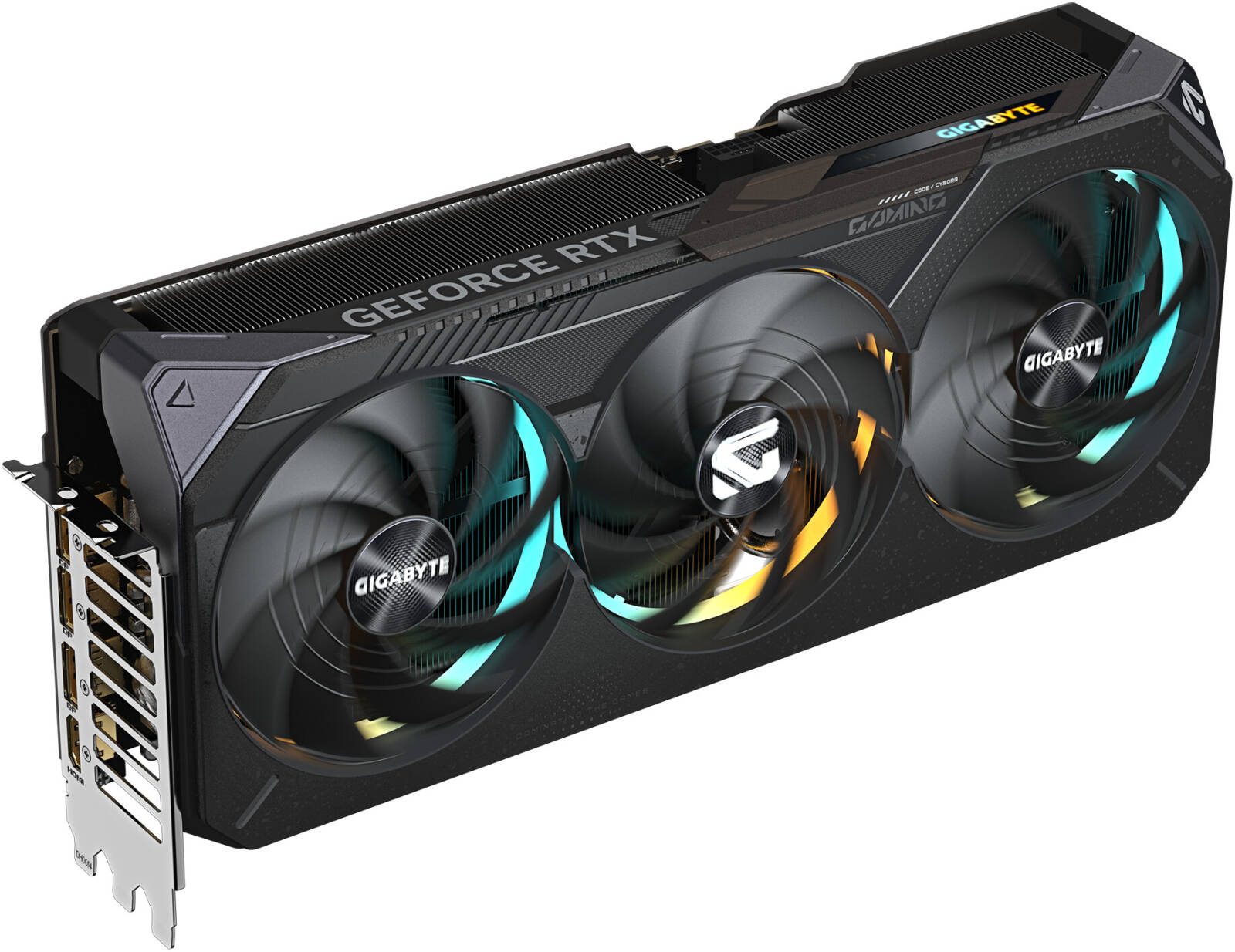
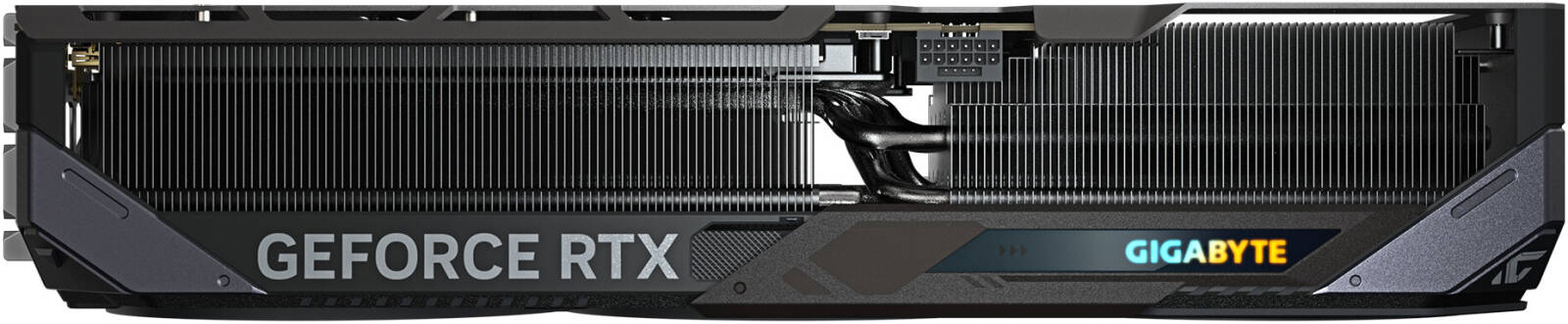
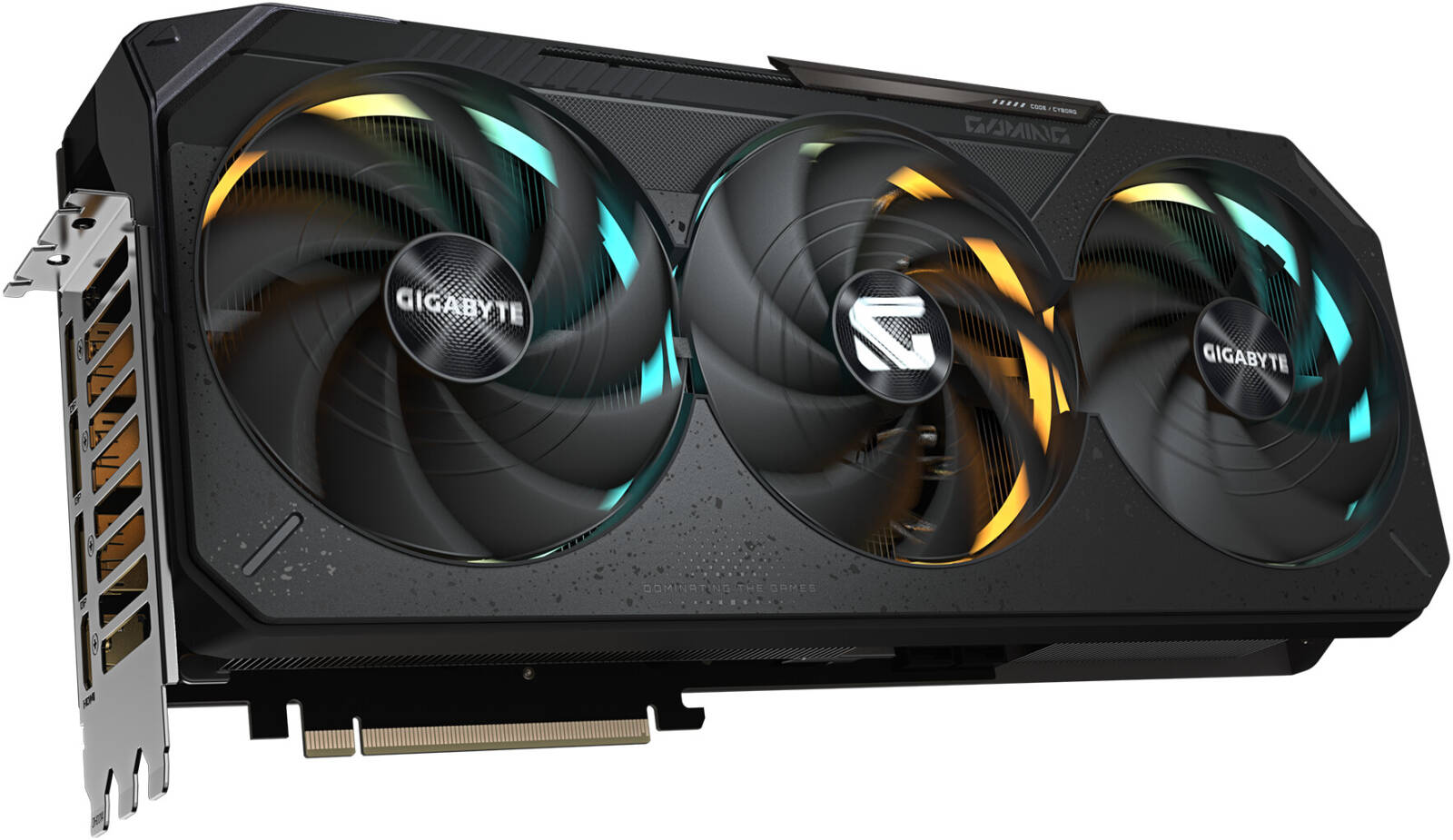
$2,718.49
Gigabyte RTX 5090 Gaming OC 32G (GV-N5090GAMING OC-32GD) combines NVIDIA’s 21,760-core GeForce RTX 5090 with 32GB GDDR7, a 512-bit memory interface and a 2550 MHz factory core clock. Gigabyte uses its WINDFORCE cooling system, Hawk fan design, server-grade thermal conductive gel, Dual BIOS and reinforced construction.
The official card size is 342 × 152 × 70 mm and Gigabyte recommends a 1000W PSU with one 16-pin power connector. Check the live Gigabyte RTX 5090 Gaming OC 32G price above and verify fit, power, accessory pack, warranty registration eligibility and delivery terms before ordering.
Related products, categories and research.
Gigabyte RTX 5090 Gaming OC 32G (GV-N5090GAMING OC-32GD) is a factory-overclocked NVIDIA Blackwell graphics card with 21,760 CUDA cores, 32GB GDDR7 memory, a 512-bit interface and a 2550 MHz core clock. AI Robot Supplier currently lists this exact model at $2,718. Buyers should compare the exact board, case fit, 1000W PSU requirement, 16-pin power connection, warranty eligibility and delivery terms rather than treating every RTX 5090 listing as interchangeable.
32GB factory-overclocked Blackwell flagship GPU
Gigabyte RTX 5090 Gaming OC 32G, exact model GV-N5090GAMING OC-32GD, is Gigabyte’s factory-overclocked air-cooled implementation of NVIDIA’s GeForce RTX 5090. It combines the full 21,760-CUDA-core RTX 5090 GPU with 32GB of GDDR7 memory, a 512-bit memory interface and a manufacturer-specified 2550 MHz core clock.
The Gaming OC is not simply a reference RTX 5090 with a different exterior. Gigabyte builds this configuration around its WINDFORCE cooling system, Hawk fan design, alternate fan rotation, large vapor chamber, composite copper heat pipes, server-grade thermal conductive gel, screen cooling, Dual BIOS, RGB Halo lighting and a reinforced metal structure.
The card is physically substantial. Gigabyte specifies dimensions of 342 × 152 × 70 mm, recommends a 1000W power supply and uses one 16-pin GPU power connector. That makes case clearance, PSU quality and power-cable routing part of the buying decision rather than afterthoughts.
AI Robot Supplier currently lists the Gigabyte RTX 5090 Gaming OC 32G price at $2,718. Public exact-model prices vary significantly, so the correct comparison is not simply the lowest headline figure: verify model number, product condition, stock, supplied accessories, warranty route, freight, tax and import responsibilities before approving an order.
Exact-model distinction: this page covers GV-N5090GAMING OC-32GD. It does not describe the AORUS MASTER, AORUS WATERFORCE, WINDFORCE OC, STEALTH ICE or another RTX 5090 configuration.
The current Gigabyte RTX 5090 Gaming OC 32G price on AI Robot Supplier is $2,718. This is the price displayed for the exact GV-N5090GAMING OC-32GD listing at the time this buyer guide was prepared.
Public U.S. exact-model pricing currently shows a wide spread. Recent Newegg search results show the card at approximately $4,899.99 and out of stock, while B&H currently displays approximately $4,499.99 and temporarily out of stock. Best Buy’s exact-model page is no longer showing the card as available new.
| Seller / reference | Observed price / status | Buying note |
|---|---|---|
| AI Robot Supplier | $2,718 | Current live exact-model listing. Confirm stock, condition, warranty and destination-specific shipping. |
| Newegg | ~$4,899.99 / out of stock | Exact GV-N5090GAMING OC-32GD public reference; marketplace price and stock can change. |
| B&H | ~$4,499.99 / temporarily out of stock | Exact model reference with manufacturer-part identification. |
| Best Buy | New condition currently unavailable | Useful review/Q&A reference, but current new-stock availability is limited. |
Price differences can reflect stock scarcity, seller margin, marketplace markups, warranty handling, taxes, product condition, bundled promotions and fulfilment region. A significantly lower price should therefore be supported by clear documentation of the exact model and commercial terms.
Product overview
Gigabyte RTX 5090 Gaming OC 32G is a custom RTX 5090 graphics card designed for buyers who want flagship GeForce performance with a large conventional air cooler rather than an external liquid-cooling radiator.
The Gaming OC sits above Gigabyte’s basic WINDFORCE tier and below the more elaborate AORUS flagship implementations. Its value proposition is therefore not maximum luxury or the highest factory clock in Gigabyte’s range. It is a strong custom-air-cooled configuration with Dual BIOS, a factory overclock, RGB, reinforced construction and a support holder.
Gigabyte specifies a 2550 MHz core clock, compared with the 2407 MHz reference figure shown in its documentation. The GPU itself retains the full 21,760 CUDA cores and 32GB GDDR7 configuration of the RTX 5090.
The card is suitable for premium 4K gaming, ray-traced gaming, GPU rendering, video work, CUDA applications and local AI workloads that fit within 32GB of VRAM. Whether it is economically sensible depends heavily on the workload: buyers who do not need RTX 5090-class performance may achieve better value with an RTX 5080, while professional buyers needing workstation-oriented certification or support should also compare RTX PRO.
The most important procurement point is to buy by exact manufacturer part number. RTX 5090 cards differ in dimensions, cooler design, firmware, clocks, power behaviour, warranty and included accessories.
Match the manufacturer part number on the quotation, product label and supplied unit.
Plan around 342 × 152 × 70 mm plus safe clearance for the 16-pin power cable and chassis airflow.
Verify PSU suitability, connector routing, registration eligibility and the exact warranty route for your destination.
Use the model code and exact-unit photographs where available to verify the card, cooler, output bracket and supplied accessories before dispatch.
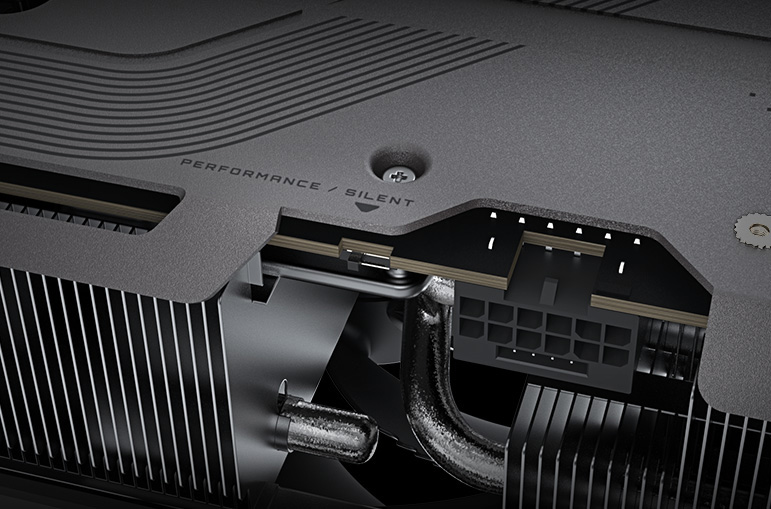
The main table below follows Gigabyte’s current official specification for exact model GV-N5090GAMING OC-32GD. Independent measurements are labelled separately so retailer or review figures are not presented as manufacturer specifications.
| Model / configuration | Gigabyte GeForce RTX 5090 GAMING OC 32G / GV-N5090GAMING OC-32GD |
|---|---|
| GPU | NVIDIA GeForce RTX 5090 |
| Architecture | NVIDIA Blackwell |
| CUDA cores | 21,760 |
| Gigabyte core clock | 2550 MHz |
| Reference clock shown by Gigabyte | 2407 MHz |
| Memory capacity | 32GB |
| Memory type | GDDR7 |
| Memory speed | 28 Gbps |
| Memory bus | 512-bit |
| Card bus | PCI Express 5.0 |
| Maximum digital resolution | 7680 × 4320 |
| Maximum displays | 4 |
| Display outputs | 3 × DisplayPort 2.1b + 1 × HDMI 2.1b |
| Official dimensions | 342 × 152 × 70 mm |
| PCB form | ATX graphics card |
| Independent card-weight measurement | Approx. 2.24 kg measured by TechPowerUp; Gigabyte does not list card weight in its main specification table |
| Practical slot requirement | 70 mm thick; plan roughly four expansion-slot positions and verify chassis layout |
| Recommended PSU | 1000W |
| Power connector | 1 × 16-pin |
| Official board-power figure | Not published in Gigabyte’s main exact-model specification table; do not treat retailer TDP fields as official Gigabyte TGP |
| Cooling | WINDFORCE triple-fan system with Hawk fans, large vapor chamber, composite copper heat pipes, thermal conductive gel and screen cooling |
| Fan behaviour | 3D Active Fan semi-passive operation |
| BIOS | Dual BIOS — Performance / Silent |
| Lighting | RGB Halo |
| Software | Gigabyte Control Center plus NVIDIA driver/application ecosystem |
| DirectX | DirectX 12 API |
| OpenGL | 4.6 |
| Current AI Robot Supplier price | $2,718 |
Manufacturer specifications can be revised. Confirm the final exact SKU, physical condition, BIOS revision and supplied accessory scope before installation.
The cooling system is one of the strongest reasons to compare board-level RTX 5090 models instead of shopping only by GPU name. Gigabyte’s Gaming OC implementation uses a large triple-fan WINDFORCE cooler rather than NVIDIA’s Founders Edition design.
Gigabyte describes the cooler as using Hawk fans, alternate spinning, composite copper heat pipes, a large vapor chamber, 3D Active Fan operation, screen cooling and server-grade thermal conductive gel. These are model-specific features of the Gaming OC thermal solution.
The fan blades use Gigabyte’s Hawk geometry and neighbouring fans rotate in opposite directions. The purpose is to control turbulence and maintain useful airflow through the dense heatsink. Manufacturer airflow claims are best understood as design measurements rather than guaranteed system-level temperature improvements because case ventilation strongly affects final results.
The vapor chamber makes direct thermal contact with the GPU area and distributes heat into the heat-pipe and fin structure. For a board this powerful, that heat-transfer path is important because the cooler must handle sustained gaming, rendering and compute workloads without immediately saturating.
Gigabyte uses a deformable thermal gel around components including VRAM and MOSFET areas. The company positions this as a way to maintain contact across irregular component heights and resist deformation during long-term use and transportation.
The physical BIOS switch allows the buyer to choose between Performance and Silent profiles. Performance is the factory-default mode. Silent mode uses a quieter operating profile but does not make case airflow irrelevant; a high-power GPU still needs effective intake and exhaust ventilation.
Independent owner and review feedback commonly praises the card’s noise and thermal behaviour, but acoustic results vary substantially by chassis, fan curve, room temperature and workload. Treat any single review temperature as a test result rather than a universal operating specification.
Power and physical installation are major purchase considerations for this card. Gigabyte officially recommends a 1000W system power supply and specifies one 16-pin GPU power connector.
The included adapter converts the GPU connection to four PCIe 8-pin inputs. Buyers using the adapter should follow both the GPU and PSU manufacturer’s instructions and should not assume that any combination of 8-pin cables is electrically equivalent. A high-quality modern PSU with suitable native high-power GPU cabling can simplify installation.
Retailer databases sometimes publish different TDP or TGP figures for this exact card. Gigabyte’s own exact-model specification page does not state a board-power number; it publishes the 1000W PSU recommendation and 16-pin connector instead. Independent technical testing has observed substantially higher maximum power behaviour than some retailer database fields suggest.
For that reason, this page does not present a retailer’s 430W field as an official Gigabyte specification. Buyers should plan the system around Gigabyte’s PSU guidance and the realities of an RTX 5090-class board rather than an isolated marketplace field.
The official dimensions are 342 × 152 × 70 mm. A case specification that says “supports 350 mm GPUs” may still be unsuitable if a front radiator, pump/reservoir, thick intake fans or storage cage reduces real clearance.
The 152 mm width also matters because the power cable exits the side of the card. Leave enough room between the connector and case panel so the cable is not sharply bent immediately at the plug.
Independent measurements place the board at roughly 2.24 kg. Gigabyte includes a versatile VGA holder specifically because a card of this size can place substantial leverage on the motherboard slot. Install the support hardware according to the chassis layout rather than allowing the card to hang unsupported.
This section is a buyer analysis, not an AI Robot Supplier hands-on benchmark. The page does not claim that AI Robot Supplier personally tested this graphics card.
Independent reviews of the exact GV-N5090GAMING OC-32GD generally show the expected pattern for a premium factory-overclocked RTX 5090: performance is modestly above the Founders Edition in GPU-limited workloads, while the larger cooler is designed to manage thermals and acoustics across sustained gaming loads.
TechPowerUp measured the card as a four-slot-class design weighing approximately 2242 g and documented a high maximum power limit. Its testing also confirms that the Gaming OC is already tuned aggressively from the factory, which helps explain why manual overclocking may offer relatively limited practical gains compared with simply running the card as supplied.
A newer August 2026 exact-model review again found that the Gaming OC provides a measurable advantage over the reference RTX 5090 depending on title and settings, while maintaining strong thermal behaviour in that review system. Those results support the general buying case for the Gaming OC cooler and factory clock but should not be converted into guaranteed FPS or temperature figures for every PC.
The RTX 5090 class makes the most commercial sense when the buyer is targeting demanding 4K graphics, high-refresh displays, ray tracing, path tracing or other workloads that can actually use the GPU’s performance. A buyer playing mainly lighter esports titles at lower resolutions may be paying for substantial unused capability.
Gigabyte’s current product page highlights NVIDIA Blackwell, fifth-generation Tensor Cores, fourth-generation RT Cores and current DLSS 4.5 support. Availability of specific DLSS features still depends on game and software implementation.
For rendering, video production and GPU-accelerated creative applications, the 32GB framebuffer can be more valuable than a small percentage difference in gaming FPS. Buyers should check the memory requirement and GPU acceleration support of their actual applications.
Gigabyte Control Center (GCC) is the manufacturer’s management software for supported Gigabyte products. For this graphics card, GCC is relevant to supported clock, voltage, power-target, fan and lighting controls.
The wider GPU software stack comes from NVIDIA. Buyers can use Game Ready or Studio drivers depending on workload priorities, while supported applications can access CUDA, Tensor Core, RT Core, NVENC and other platform features.
The Gaming OC uses RGB Halo lighting around the fan area. Lighting support can depend on current Gigabyte Control Center versions and installed components. Community reports show that some buyers troubleshoot RGB detection or GCC behaviour after installation; these reports should be treated as individual troubleshooting cases rather than evidence that every card has an RGB fault.
For installation or stability troubleshooting, use current Gigabyte and NVIDIA support channels rather than relying on random firmware files from forums. If the card experiences black screens, output problems or unusual fan behaviour, verify drivers, power connection, BIOS/firmware guidance and system stability before assuming the GPU itself is defective.
The card is a PCIe 5.0 device. PCI Express is designed for backward compatibility, so the card can generally operate in a compatible PCIe 4.0 x16 platform. Buyers should still confirm motherboard BIOS support, slot configuration, physical clearance and platform-specific lane allocation before upgrading an older system.
Designed for buyers targeting premium high-resolution gaming, high-refresh displays, ray tracing and path-traced titles.
32GB VRAM can support large scenes and GPU-accelerated render workloads where application support and memory capacity matter.
Compatible creative software can use NVIDIA’s current media engine, NVENC and Studio-driver ecosystem.
The card can accelerate CUDA-supported applications and general GPU development within the GeForce software environment.
32GB VRAM can be useful for local model inference and experimentation where the selected model fits within available memory.
Three DisplayPort 2.1b outputs and one HDMI 2.1b support up to four displays according to Gigabyte’s specification.
Large VRAM does not automatically make a GeForce card equivalent to a professional workstation GPU. Buyers requiring application certification, enterprise support arrangements, workstation-oriented reliability features or larger memory capacities should evaluate professional RTX products separately.
The most useful comparison is not simply “RTX 5090 vs RTX 5090.” Buyers should compare the specific board design, size, clock, cooling and price premium.
| Configuration | Memory | Core clock | Dimensions | PSU | Best fit |
|---|---|---|---|---|---|
| RTX 5090 Gaming OC 32G | 32GB GDDR7 | 2550 MHz | 342 × 152 × 70 mm | 1000W | Factory-OC RTX 5090 with large air cooling and Dual BIOS without AORUS flagship pricing |
| AORUS RTX 5090 MASTER | 32GB GDDR7 | 2655 MHz | 360 × 150 × 75 mm | 1000W | Buyer who specifically wants Gigabyte’s higher-clocked AORUS flagship implementation |
| Gigabyte RTX 5080 GAMING 16GB | 16GB GDDR7 | 2617 MHz | 340 × 140 × 70 mm | 850W | Buyer who does not need RTX 5090-class GPU performance or 32GB VRAM |
Both use the same RTX 5090 GPU family, 32GB GDDR7 memory, 512-bit bus and 1000W PSU recommendation. The AORUS MASTER raises the listed core clock to 2655 MHz and is physically larger at 360 × 150 × 75 mm.
Choose Gaming OC when you want a strong custom RTX 5090 implementation and do not specifically need the higher AORUS tier.
Choose AORUS MASTER when its higher factory clock and more elaborate flagship design justify the extra purchase cost and larger physical footprint.
The RTX 5080 GAMING has half the VRAM capacity at 16GB and sits in a lower performance tier with an 850W PSU recommendation. For many buyers, the RTX 5080 is the more economically sensible card. The 5090 becomes compelling when 4K performance, heavy ray tracing, 32GB VRAM or compute workloads justify the additional purchase price, power and cooling requirements.
Gigabyte’s current specification lists the following accessories for GV-N5090GAMING OC-32GD:
Gigabyte GeForce RTX 5090 GAMING OC 32G exact board configuration.
One 12V-2×6 to four PCIe 8-pin adapter according to Gigabyte’s specification.
Versatile VGA holder and holder documentation for supporting the large card.
Manufacturer quick-start / installation documentation.
Registration information relevant to Gigabyte’s extended warranty program.
The written quotation and actual packing list should control what is treated as included.
Do not assume that a PSU, riser cable, display cable, aftermarket 90-degree power cable or other system component is included unless it appears in the written order scope.
Gigabyte advertises a four-year warranty program for this product: the company’s standard three-year graphics-card warranty plus one additional year when an eligible card is registered online within 30 days of purchase.
The important word is eligible. Warranty treatment can depend on purchase region, sales channel, serial number and Gigabyte’s regional program terms. An international buyer should not assume that a fourth warranty year or cross-border service automatically follows every card.
Before ordering, confirm:
For drivers, firmware, utilities and technical support, use the exact GV-N5090GAMING OC-32GD Gigabyte support page rather than a generic RTX 5090 download page.
Send your delivery country, required quantity and purchase deadline so current availability, exact GV-N5090GAMING OC-32GD configuration, warranty and freight terms can be confirmed.
International shipping can be arranged for approved destinations subject to product availability, freight requirements, customs regulations and the final commercial terms.
Because a premium GPU is compact relative to its value, the shipment should be treated as high-value electronics rather than ordinary low-cost parcel freight. Buyers should confirm carrier, insurance, declared value, signature requirements and packaging before dispatch.
Destination-country costs may include VAT, sales tax, customs duty, brokerage and local clearance fees unless the written order specifically says they are included.
For B2B imports, request a commercial invoice containing the exact model, quantity, value and seller/buyer details needed for local customs processing.
Gigabyte embeds this Hawk Fan feature video within its current RTX 5090 Gaming OC product presentation. It illustrates the fan technology used in the WINDFORCE cooling system; it should not be interpreted as an independent benchmark of this exact graphics card.
Buyer questions
Answers to high-intent buyer questions about the GV-N5090GAMING OC-32GD price, specifications, size, cooling, power, PCIe support, warranty and international purchase.
The exact model covered on this page is GV-N5090GAMING OC-32GD. Use this part number when comparing sellers because Gigabyte produces multiple RTX 5090 configurations.
AI Robot Supplier currently lists the exact GV-N5090GAMING OC-32GD at $2,718. Market pricing varies significantly, so use the live product price and written quotation as the current transaction reference.
Gigabyte specifies 32GB of GDDR7 memory running at 28 Gbps on a 512-bit memory interface.
The exact card has 21,760 CUDA cores.
Gigabyte specifies a 2550 MHz core clock. The manufacturer lists 2407 MHz as the reference-card figure.
The manufacturer specifies 342 × 152 × 70 mm. Check radiator, fan, drive-cage and power-cable clearance rather than relying only on the case’s advertised maximum GPU length.
Gigabyte does not publish card weight in its main specification table. TechPowerUp independently measured its review sample at approximately 2242 g. Treat that as an independent measurement rather than an official manufacturer specification.
The official card thickness is 70 mm. Depending on how a chassis defines slot spacing, plan for roughly four expansion-slot positions and verify motherboard/chassis clearance.
Gigabyte officially recommends a 1000W PSU. Actual PSU suitability also depends on CPU power, PSU quality, transient handling, motherboard, storage and other system components.
The card uses one 16-pin power connector. Gigabyte lists a 12V-2×6-to-four-PCIe-8-pin adapter in the accessory package.
Do not treat retailer database fields as an official Gigabyte board-power specification. Gigabyte’s current exact-model specification page does not publish a TGP figure; it specifies a 1000W PSU and one 16-pin power connector. Independent reviews have documented substantially higher maximum board-power behaviour.
Yes. Gigabyte provides Performance and Silent BIOS modes. Performance mode is the factory-default setting.
Yes. The card includes Gigabyte RGB Halo lighting. Supported lighting controls are managed through Gigabyte Control Center.
Confirm the current GCC version, graphics-card detection, installed Gigabyte components and current manufacturer support guidance. Community reports about RGB detection are useful for troubleshooting research but should not be assumed to affect every card.
The card uses PCI Express 5.0. PCIe is backward compatible, so it can generally operate in a compatible PCIe 4.0 x16 system. Verify motherboard BIOS support, physical slot configuration and platform lane allocation before upgrading.
Gigabyte specifies support for up to four displays using three DisplayPort 2.1b outputs and one HDMI 2.1b output.
Test another known-good cable and display, verify the monitor input, reinstall or update the GPU driver, check firmware/support guidance and reseat the card if necessary. If one physical port remains non-functional after system troubleshooting, contact the applicable seller or warranty service.
Yes. The RTX 5090 class is intended for premium high-resolution gaming, including demanding ray-tracing workloads. Actual performance varies by title, CPU, graphics settings, driver and use of technologies such as DLSS.
Gigabyte’s current product documentation advertises NVIDIA DLSS 4.5 capabilities on the Blackwell platform. Individual feature availability depends on the game or application.
Yes. CUDA and compatible AI applications can use the Blackwell GPU and 32GB VRAM for local inference, experimentation and GPU-accelerated development. Large workloads can still exceed 32GB and may be better suited to professional or data-center hardware.
It can provide substantial performance in applications that support GeForce CUDA/RTX acceleration. Buyers needing professional certification, enterprise support or workstation-specific features should separately evaluate RTX PRO products.
Both use 32GB GDDR7 and the full RTX 5090 GPU. Gigabyte lists Gaming OC at 2550 MHz and 342 × 152 × 70 mm, while AORUS MASTER is listed at 2655 MHz and 360 × 150 × 75 mm. AORUS MASTER is the higher premium tier.
Choose the RTX 5090 when you specifically need its higher performance or 32GB VRAM. The RTX 5080 can offer substantially lower purchase and power requirements for buyers whose gaming or professional workloads do not need the 5090’s additional capability.
Gigabyte lists the graphics card, quick guide, warranty-registration material, one 12V-2×6 to four PCIe 8-pin adapter, versatile VGA holder and holder manual.
Gigabyte advertises its standard three-year coverage plus one additional year for qualifying cards registered online within 30 days. Confirm regional and sales-channel eligibility for the exact supplied unit.
International shipment can be arranged for approved destinations subject to product availability, freight, insurance, customs requirements and final commercial terms. Request destination-specific shipping information before payment.
Confirm exact GV-N5090GAMING OC-32GD identity, condition, 32GB configuration, case clearance, PSU quality, 16-pin cable arrangement, support-bracket installation, warranty, accessory package, shipping and total landed cost.
GV-N5090GAMING OC-32GD identity, condition, accessories and available serial information can be confirmed before order approval where applicable.
Quantity, currency, supplied scope, warranty and destination-specific terms can be documented before purchase.
Export packing, freight, insurance and commercial documentation can be coordinated for approved destinations.
Compare the Gaming OC with AORUS RTX 5090, competing RTX 5090 boards, RTX 5080 and professional GPUs before committing.
RTX 5090 commercial quotation
Send your delivery country, required quantity and purchase timeline to confirm the current $2,718 listing, availability and exact GV-N5090GAMING OC-32GD supplied package. For business purchases, request a written quotation showing price, condition, accessories, warranty, freight and delivery responsibilities before approval.
Tell us what you need — we respond within one business day.