Philips ClearVue 550
Philips’ ClearVue family brochure explicitly compares ClearVue 350, 550, 650 and 850 and documents model-level feature differences
Philips ClearVue 550 product information
Philips’ ClearVue family brochure explicitly compares ClearVue 350, 550, 650 and 850 and documents model-level feature differences
For procurement, confirm the exact model or part number, compatibility, included accessories, product condition and configuration against the written quotation before installation or deployment.
Three checks before purchase
Match the model, part number and serial or product-label details to the quotation.
Review system, accessory, software, power and facility requirements where relevant.
Confirm condition, included items, warranty, documentation and delivery terms before payment.
Philips ClearVue 550 images
Use the final quotation and exact-unit photographs to confirm the supplied configuration and condition.
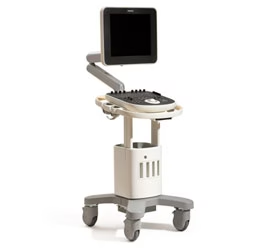
Important Philips ClearVue 550 details
Product-specific points supported by the available manufacturer, regulatory or technical documentation.
Philips’ ClearVue family brochure explicitly compares ClearVue 350, 550, 650 and 850…
Philips’ ClearVue family brochure explicitly compares ClearVue 350, 550, 650 and 850 and documents model-level feature differences
Philips DICOM documentation explicitly covers ClearVue 350/550/650/850, establishing…
Philips DICOM documentation explicitly covers ClearVue 350/550/650/850, establishing the software/network product family
Verify software release, transducers, optional 3D/4D/elastography packages, DICOM and…
Verify software release, transducers, optional 3D/4D/elastography packages, DICOM and physical condition
Where Philips ClearVue 550 can fit
Final suitability depends on the exact model configuration, compatible systems, professional-use requirements and manufacturer instructions.
Imaging workflow
Evaluate the system or component for the intended diagnostic-imaging workflow and the exact installed configuration.
Compatibility
Confirm supported consoles, probes, coils, software, interfaces or accessories before deployment.
Replacement or expansion
Useful for replacing a matching component or expanding a compatible imaging fleet when model and revision requirements align.
Acceptance checks
Verify functional testing, calibration/service status and included accessories before acceptance.
Philips ClearVue 550 specifications and identification
The table summarizes available model information. Configuration-sensitive values should be checked against the supplied unit and manufacturer documentation.
- Product
- Philips ClearVue 550
- Manufacturer / brand
- PHILIPS
- Model / part reference
- ClearVue 550
- Equipment type
- Ultrasound
What to verify before ordering Philips ClearVue 550
Use this checklist to reduce model, configuration and compatibility mismatches.
- Evaluate the system or component for the intended diagnostic-imaging workflow and the exact installed configuration.
- Confirm supported consoles, probes, coils, software, interfaces or accessories before deployment.
- Useful for replacing a matching component or expanding a compatible imaging fleet when model and revision requirements align.
- Verify functional testing, calibration/service status and included accessories before acceptance.
- Confirm the exact model, serial/part number and visible product label.
- Confirm the supplied accessories, cables, probes, handpieces, modules or consumables as applicable.
Philips ClearVue 550 manufacturer and technical resources
Authoritative manufacturer, regulatory and technical references are prioritized where available.
Manufacturer / official technical resource
Use this external technical resource to confirm model identity, compatibility or configuration-sensitive details.
Manufacturer / official technical resource
Use this external technical resource to confirm model identity, compatibility or configuration-sensitive details.
Frequently asked questions
Key questions for evaluating Philips ClearVue 550 before purchase.
What is Philips ClearVue 550?
Philips’ ClearVue family brochure explicitly compares ClearVue 350, 550, 650 and 850 and documents model-level feature differences
What should be checked before ordering Philips ClearVue 550?
Confirm the exact model or part number, compatibility, included accessories, functional condition, service history and any configuration-sensitive requirements.
Are all Philips ClearVue 550 configurations identical?
No. Hardware revision, software, accessories, probes, handpieces, modules or other options can vary. The written quotation and exact-unit identification should define the supplied configuration.
What is included with Philips ClearVue 550?
Only items explicitly listed in the quotation and packing scope should be treated as included. Reference photographs can show accessories or system components that are not part of the final offer.
Can Philips ClearVue 550 be shipped internationally?
International B2B delivery can be arranged for approved destinations subject to product-specific transport requirements, customs rules and the agreed freight, insurance and delivery terms.
PHILIPS documentation for Philips ClearVue 550
Manufacturer names and trademarks are used for product identification. Confirm model-specific instructions, compatibility and regional requirements before use.
Procurement support for Philips ClearVue 550
Model, label/serial information, condition and supplied configuration can be confirmed before dispatch.
Quotation, packing scope, warranty terms and delivery responsibilities are documented before order approval.
Export packing, freight, insurance and shipment documentation can be coordinated for approved destinations.
Support is available for configuration questions, installation planning and procurement documentation.
Request a Philips ClearVue 550 quote
Include delivery country, quantity, required configuration and target purchase date for a destination-specific offer.