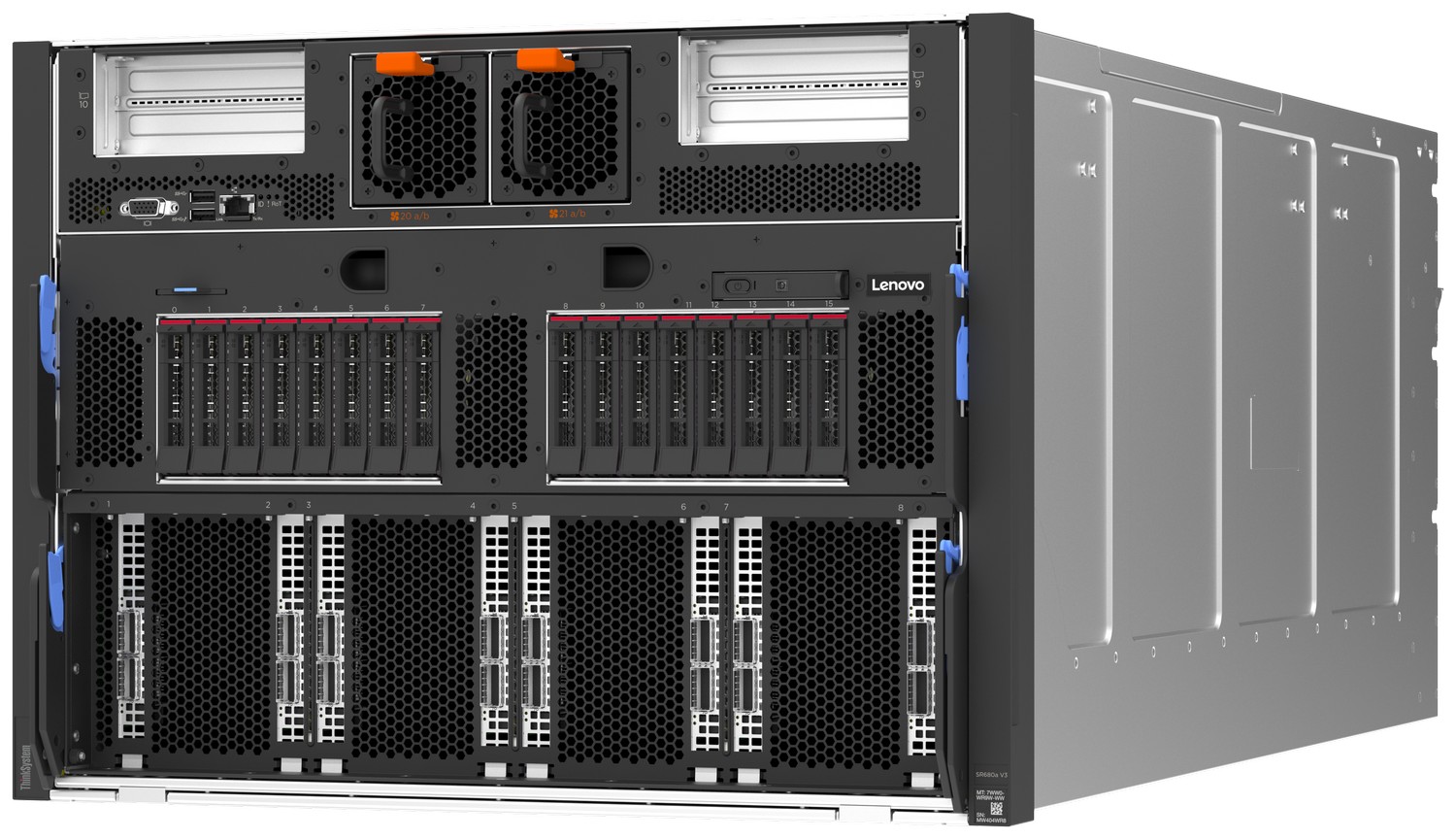
Lenovo ThinkSystem SR680a V3 with 8x NVIDIA B200 180GB
$330,285.06
Lenovo ThinkSystem SR680a V3 B200 is an air-cooled 8U server platform with eight NVIDIA B200 180 GB SXM6 GPUs and two 5th Gen Intel Xeon Scalable processors. The 7DM9 platform supports 32 DDR5 DIMMs, sixteen 2.5-inch Gen5 NVMe bays and ten PCIe 5.0 x16 slots. Confirm installed CPUs, RAM, drives, network adapters and service scope for the offered system.
Explore Related
Related products, categories and research.
SR680a V3 B200 is Lenovo ThinkSystem’s air-cooled 8U platform for eight NVIDIA B200 180 GB SXM6 GPUs. Machine type 7DM9 combines the GPU complex with two 5th Gen Intel Xeon Scalable processors, DDR5 host memory and front-accessible PCIe expansion. The eight accelerators provide approximately 1.44 TB of aggregate GPU memory.
This listing identifies the B200 variant. Lenovo publishes a separate guide for the H100/H200 versions of the similarly named server. Use the B200-specific guide and machine type when checking processors, storage, power and supported options. The recorded seller SKU is 7DM9-B200-8GPU; the complete configured Lenovo machine type/model and installed component list still require confirmation.
SR680a V3 B200 specifications
| Component | Lenovo platform specification |
|---|---|
| Form factor | 8U rackmount, air cooled; machine type 7DM9 |
| GPU complex | 8 NVIDIA B200 180 GB SXM6 GPUs; 1000 W GPU specification |
| Aggregate GPU memory | 8 × 180 GB = 1440 GB, approximately 1.44 TB |
| GPU communication | NVIDIA NVLink and NVSwitch |
| Processors | Two 5th Gen Intel Xeon Scalable processors; single-processor configurations are not supported |
| Host memory | 32 DDR5 RDIMM slots; up to 4 TB using 32 × 128 GB RDIMMs |
| Memory population | Eight channels per CPU, two DIMMs per channel; up to 5600 MT/s at 1DPC or 4400 MT/s at 2DPC |
| Front drive bays | 16 × 2.5-inch hot-swap PCIe 5.0 NVMe bays |
| Boot storage | One or two M.2 22110 NVMe drives; optional Intel VROC RAID |
| Expansion | 10 PCIe 5.0 x16 FHHL slots; eight with GPU Direct connections plus two additional slots |
| Power supplies | 8 hot-swap 3200 W Titanium supplies, up to N+N redundancy; high-voltage AC supply required |
| Management | XClarity Controller 2, dedicated management Ethernet, integrated diagnostics panel |
| Chassis dimensions | 447 × 351 × 943 mm, width × height × depth; excludes protruding components |
| Maximum weight | 116 kg manufacturer specification |
Lenovo B200 server compute and memory
The NVIDIA B200 complex occupies the lower part of the system. NVLink and NVSwitch carry communication between the accelerators, while PCIe connects the host and I/O resources. GPU memory and CPU-attached DDR5 memory are separate resources; aggregate accelerator capacity should not be read as host RAM.
Lenovo’s B200 GPU table lists 8 TB/s memory bandwidth per GPU. Hardware bandwidth is distinct from application throughput. Training and inference results depend on model size, precision, framework, batching and data preparation, so no token rate or training-time guarantee follows from the memory capacity alone.
Two host processors are required. Lenovo lists supported 5th Gen Xeon Scalable options with different core counts and frequencies, up to 64 cores per CPU. The final processor part numbers establish the supplied performance characteristics; this model does not use the Xeon 6 platform found in some other eight-GPU servers.
The memory subsystem has sixteen DIMM slots per CPU. Its supported speed changes with the DIMM population, and maximum capacity does not imply maximum clock rate. Lenovo’s standard specification lists up to 4 TB with 128 GB RDIMMs; the 2 TB example in the feature summary uses 64 GB DIMMs. Confirm installed module capacity, quantity and validated operating speed together.
PCIe 5.0 NVMe storage and network options
Sixteen front 2.5-inch bays use two eight-bay backplanes. Although the backplane name includes AnyBay, Lenovo states that this B200 system supports NVMe drives only. Each drive has a PCIe 5.0 x4 host interface. The manufacturer requires both backplanes; configurations with zero or one backplane are not supported.
The system board has dedicated positions for one or two M.2 22110 NVMe drives. Other M.2 lengths and SATA M.2 drives are not supported in those positions. Intel VROC RAID is optional, so a pair of installed boot drives should not automatically be described as a configured mirrored boot volume.
Eight front-accessible PCIe slots provide GPU Direct connections for high-speed adapters, and two further FHHL slots provide additional expansion. Lenovo documents support for network adapters up to 400 Gb/s, BlueField-3 DPU options and separate management networking. These are supported options rather than a statement that particular adapters, optics or cables are supplied.
The front panel provides USB 3, USB 2, VGA and a dedicated 1 GbE XCC management port. The rear has no I/O ports in the standard specification. This front-I/O layout matters when planning cable routing and service access within the rack.
8 GPU B200 server installation
The chassis requires eight rack units and has a nominal depth of 943 mm. Check clearance for rack flanges, power-supply handles, cables and any bezel separately from the enclosure dimensions. The manufacturer’s maximum weight is 116 kg, making rack capacity and suitable lifting arrangements part of installation planning.
Eight 3200 W hot-swap power supplies support up to N+N redundancy. Lenovo specifies high-voltage AC operation and lists the detailed input range as nominal 200–240 V AC. Confirm the configured electrical requirements, circuits, PDU connections and power cords using the exact system documentation. Supply ratings do not measure the server’s actual operating consumption.
Front-to-rear airflow serves the CPU, storage and GPU areas through separate fan groups. Lenovo identifies two front fans, fifteen rear GPU-subsystem fans and two auxiliary fans, in addition to fans inside the power supplies. Maintain the supported environmental limits for the chosen configuration; temperature support can vary with hardware and altitude.
XClarity Controller 2 and software readiness
XClarity Controller 2 monitors hardware and exposes management access through the dedicated Ethernet interface. The integrated diagnostics panel provides local status information. Remote-control functions and other advanced features can require the optional XCC Platinum upgrade; their presence should be checked against the system’s licence configuration.
The B200 product guide lists Red Hat Enterprise Linux 9.5 and 9.6, and Ubuntu 22.04 LTS and 24.04 LTS. Validate the current operating-system matrix, GPU drivers, firmware and application requirements for the installed components. A supported operating system is not evidence of an included software licence or preconfigured application stack.
ThinkSystem SR680a V3 B200 documentation and configuration
Consult the official Lenovo ThinkSystem B200 product guide for component rules and supported options. Related platforms are listed under Networking & AI Infrastructure.
Before ordering, identify the configured machine model, CPU pair, DIMMs, SSDs, NICs, licences and accessories in the written bill of materials. Confirm the unit’s condition and applicable service entitlement for this offer. Manufacturer warranty options do not establish the coverage of a particular supplied unit. Use the configuration enquiry page to provide the required workload and hardware scope.
Variant questions
What should an SR680a V3 B200 price comparison cover?
Compare the B200-specific 7DM9 platform and matching installed CPU, DIMM, SSD and network configurations. The similarly named H100/H200 versions follow a separate product guide, and a platform specification does not establish the components or service included in a quotation.
Is this the H200 version?
No. This listing specifies the 7DM9 B200 platform with eight 180 GB SXM6 GPUs. Use the separate B200 guide when comparing options.
Can the server run with one host processor?
Lenovo states that two processors are required; a single-processor configuration is not supported.
Are all drive bays populated?
The bay count describes available positions. Installed SSD quantities, capacities and RAID configuration require confirmation for the offered system.
Related products
Recently viewed
Add AI Robot Supplier as a preferred source on Google.